

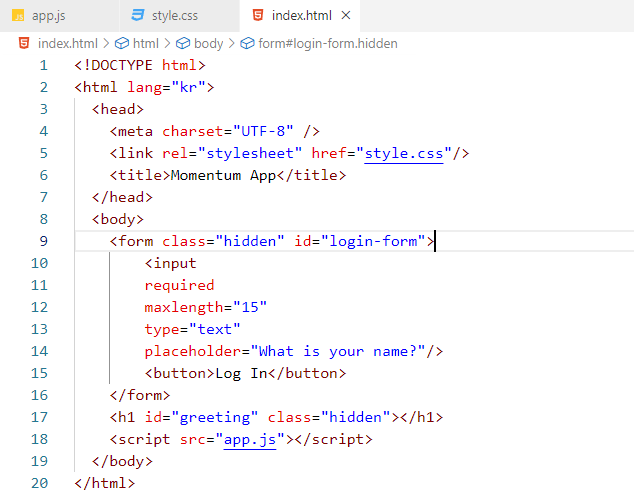
위와 같은 작업을 HTML 기본 기능을 이용하여 할 수도 있다.


● required : 해당 input을 필수 입력 항목으로 만들어 줌.
※ input의 유효성 검사를 작동시키기 위해서는 input이 form 안에 있어야 한다.
→ 다만 위 상황에선
input 안에 있는 button을 누르거나 type이 submit인 input을 클릭하면 페이지가 새로고침된다. ( + 엔터 )
즉, 이 상황에선 click에 신경 쓸 필요가 없다. form을 submit하는 것에 관심을 두어야 한다.

이렇게 preventDefault를 이용하면 새로고침되지 않으며(브라우저의 기본 동작을 막는 것), event를 쓰는 것이 관행이다.


(참고) 일반적으로 string만 포함된 변수는 대문자로 표기하고, string을 저장하고 싶을 때 사용한다.
→ 이 두 가지 방법 모두 같은 동작(string과 변수를 하나로 합쳐줌)을 수행함.
백틱(`)을 사용하는 방식이 더 새로운 방식임. 취향껏 사용하면 됨.

const loginForm = document.querySelector("#login-form");
const loginInput = document.querySelector("#login-form input");
const greeting = document.querySelector("#greeting");

const HIDDEN_CLASSNAME = "hidden";
const USERNAME_KEY = "username";

function onLoginSubmit(event){
    event.preventDefault();
    loginForm.classList.add(HIDDEN_CLASSNAME);
    const username = loginInput.value;
    localStorage.setItem(USERNAME_KEY,username);
    paintGreetings(username);
}

function paintGreetings(username){
    greeting.innerText=`Hello ${username}`;
    greeting.classList.remove(HIDDEN_CLASSNAME);
}

const savedUsername = localStorage.getItem(USERNAME_KEY);

if(savedUsername === null){
    loginForm.classList.remove(HIDDEN_CLASSNAME);
    loginForm.addEventListener("submit",onLoginSubmit);
} else{
    paintGreetings(savedUsername);
}
● localStorage : 브라우저에 뭔가를 저장할 수 있게 해줌.
개발자 도구를 이용하면 local storage에 뭐가 들어있는지 볼 수 있음.(Application - Storage - Local Storage)
(참고) 본인이 생성한 string을 반복해서 사용하게 될 경우에는 대문자 변수로 저장해놓는 것이 좋다. 눈에 띄어 실수를 줄일 수 있기 때문.
▶ interval : '매번' 일어나야 하는 무언가 (ex. 매 2초)
setInterval(함수, 시간(ms));
(참고) 1초=1,000밀리초
▶ timeout : 특정 시간 후 한번 실행됨 (ex. 5초 후)
setTimeout(함수, 시간(ms));
● padStart(길이, "채워 넣을 것") : string에 쓸 수 있는 함수 (ex. 1초 → 01초)
(cf. padEnd는 뒤를 채운다. 1 → 10)

const clock=document.querySelector("#clock");

function getClock(){
    const date=new Date();
    const hours=String(date.getHours()).padStart(2,"0");
    const minutes=String(date.getMinutes()).padStart(2,"0");
    const seconds=String(date.getSeconds()).padStart(2,"0");
    clock.innerText=`${hours}:${minutes}:${seconds}`;
}

getClock();
setInterval(getClock, 1000);
<시계만들기>
▶ Math 모듈
- Math.random() *10을 하면 0에서 10 사이의 숫자들을 얻을 수 있다.
- 정숫값으로 만드는 법 - Math.round() : 반올림, Math.ceil() : 올림, Math.floor() : 내림
☞ 같이 사용하려면 Math.floor(Math.random()*10) 이렇게 쓰면 됨.
☞ length를 이용하면 일일이 숫자를 넣지 않아도 됨.

const quotes = [
    {
        quote: "The only way not to think about money is to have a great deal of it.",
        author: "Edith Wharton",
    },
    {
        quote: "To believe with certainty we must begin with doubting.",
        author: "Stanislaw Leszczynski",
    },
    {
        quote: "Aim for success, not perfection. Never give up your right to be wrong, because then you will lose the ability to learn new things and move forward with your life.",
        author: "Dr. David M. Burns",
    },
    {
        quote: "What else is love but understanding and rejoicing in the fact that another person lives, acts, and experiences otherwise than we do?",
        author: "Friedrich Nietzsche",
    },
    {
        quote: "Nature gives you the face you have at twenty; it is up to you to merit the face you have at fifty.",
        author: "Gabriel Coco Chanel",
    },
    {
        quote: "Do not do to others what angers you if done to you by others.",
        author: "Socrates",
    },
    {
        quote: "Nothing is as far away as one minute ago.",
        author: "Jim Bishop",
    },
    {
        quote: "I do not want to die... until I have faithfully made the most of my talent and cultivated the seed that was placed in me until the last small twig has grown.",
        author: "Kathe Kollwitz",
    },
    {
        quote: "If you don't learn to laugh at trouble, you won't have anything to laugh at when you're old.",
        author: "Edgar Watson Howe",
    },
    {
        quote: "Everything has its wonders, even darkness and silence, and I learn, whatever state I am in, therein to be content.",
        author: "Helen Keller",
    },
    {
        quote: "Convictions are more dangerous enemies of truth than lies.",
        author: "Friedrich Nietzsche",
    },
    {
        quote: "Before I was shot, I always thought that I was more half-there than all-there - I always suspected that I was watching TV instead of living life. Right when I was being shot and ever since, I knew that I was watching television.",
        author: "Andy Warhol",
    },
];

const quote = document.querySelector("#quote span:first-child");
const author = document.querySelector("#quote span:last-child");

const todaysQuote = quotes[Math.floor(Math.random()*quotes.length)];

quote.innerText = todaysQuote.quote;
author.innerText = todaysQuote.author;
<오늘의 명언>

<랜덤 배경화면>
* JS → HTML
appendChild : body의 맨 뒤에 html을 추가해 줌. 맨 앞에 추가하려면 prepend를 사용하면 됨.
'JavaScript' 카테고리의 다른 글
| 자바스크립트의 타입 (0) | 2023.01.24 |
|---|---|
| 노마드 코더 바닐라JS로 크롬 앱 만들기 후기 (11.21~12.04 챌린지 졸업) (0) | 2022.12.27 |
| 노마드 코더 바닐라JS로 크롬 앱 만들기 복습용 정리(4) (0) | 2022.12.05 |
| 노마드 코더 바닐라JS로 크롬 앱 만들기 복습용 정리(2) (0) | 2022.11.25 |
| 노마드 코더 바닐라JS로 크롬 앱 만들기 복습용 정리(1) (0) | 2022.11.24 |


댓글